创建任务 Create Task #
创建任务之前需要将物品配置好,不然无法库存联动。
有库存的物品都会在物品及数量后依次显示可用库位的信息,无库存则任务状态是「Out of Stock」。
任务可通过Duplicate按钮直接复制一个新的任务出来,其主单号会在原单号后面增加
-01,Reference No. 不变,所以可以根据原单号和 Reference No. 找到新创建的订单订单中的物品都会占用保留库存,只有最终状态(Shipped或Canceled)才不会产生保留库存。新进订单会根据库存和保留库存来判断是否还有可用库存来发货。所以需要将旧订单给取消,释放出保留库存,新订单才能正常去获取库存配额。
Before creating a task, you need to configure the items, otherwise, the inventory cannot be linked.
Items with inventory will display available storage locations after the item and quantity. If there is no inventory, the task status will be “Out of Stock”.
Tasks can be directly copied to create a new task using the Duplicate button. The main order number will have suffix like
-01, and the Reference No. remains the same, so you can find the newly created order based on the orignal order number or Reference No.Items in the order will occupy reserved inventory. Only the final status (Shipped or Canceled) will not generate reserved inventory. New orders will determine whether there is available inventory for shipment based on inventory and reserved inventory. Therefore, old orders need to be canceled to release reserved inventory so that new orders can normally obtain inventory quotas.
Before creating a task, you need to configure the items, otherwise, the inventory cannot be linked.
Items with inventory will display available storage locations after the item and quantity. If there is no inventory, the task status will be “Out of Stock”.
Tasks can be directly copied to create a new task using the Duplicate button. The main order number will be regenerated, but the Reference No. remains the same, so you can find the newly created order based on the Reference No.
Items in the order will occupy reserved inventory. Only the final status (Shipped or Canceled) will not generate reserved inventory. New orders will determine whether there is available inventory for shipment based on inventory and reserved inventory. Therefore, old orders need to be canceled to release reserved inventory so that new orders can normally obtain inventory quotas.
任务类型和状态 Task Types and Statuses #
以下以英语版本为例
The following is an example in English
2C Tasks #
| Status | Description |
|---|---|
Standby | 任务待审核,此状态下不会被自动出运单,也不关联库存(不会将可用库存预留为待发货库存) |
Shipment Label Awaits | 任务处于自动出单队列中,系统将会自动生成运单;如果出单遇到报错会自动标记为 Wrong Address |
Cancel Requested | 客户申请取消订单 |
Hold | 暂停出货流程,等待客户指令中;任务中的物品会关联库存 |
Manual Handling Awaits | 一般是新的物品配置,系统无法自动出单,等待手动操作出单 |
Out of Stock | 任务中的物品存在根据系统内库存判定无库存 |
Wrong Address | 自动或批量生成运单时有地址问题报错 |
Ready to Ship | 任务等待发货中 |
In Picklist | 任务已经在捡料单中 |
Packed | 货品包装完毕,运单已打印 |
Shipped | 完成发货扫描,货品已成功出库 |
| ————————- | —————– |
Standby | Task pending review. In this state, it will not be automatically shipped and will not link to inventory (will not reserve available inventory for shipment) |
Shipment Label Awaits | Task is in the automatic shipping queue. The system will automatically generate a shipping label. If there is an error during label generation, it will be automatically marked as Wrong Address |
Cancel Requested | Customer requested to cancel the order |
Hold | Shipping process is paused, waiting for customer instructions. Items in the task will link to inventory |
Manual Handling Awaits | Usually for new item configurations, the system cannot automatically generate a label and is waiting for manual operation |
Out of Stock | Items in the task are determined to be out of stock based on the system inventory |
Wrong Address | Error in address during automatic or batch label generation |
Ready to Ship | Task is waiting for shipment |
In Picklist | Task is in the picklist |
Packed | Items are packed, and the shipping label is printed |
Shipped | Shipment scan completed, items have successfully left the warehouse |
请注意:系统右上角的“未完成任务数量”就是30天内系统内
Standby,Shipment Label Awaits,Cancel Requested,Out of Stock订单的总计。Note: The “Number of Unfinished Tasks” in the upper right corner of the system is the total of
Standby,Shipment Label Awaits,Cancel Requested, andOut of Stockorders within 30 days.
2B: FBA等 #
2B业务场景涉及到更多流程,所以增加了几个状态
The 2B business scenario involves more processes, so several statuses are added
| Status | Description |
|---|---|
Ready to Pick | 订单等待拣料,需要及时打印「Order Label」安排拣料 |
Transport Label Awaits | 等待运输单据中 |
Shipped Partially | 此订单只进行了部分扫描发货 |
| ———————————– | —————– |
Ready to Pick | Order is waiting for picking. You need to print the “Order Label” in time to arrange picking |
Transport Label Awaits | Waiting for transport documents |
Shipped Partially | Only part of the order has been scanned for shipment |
其他可能碰到的状态
Other possible statuses
| Status | Description |
|---|---|
Customer Handling Awaits | 等待客户处理,此任务先不进入仓库处理环节 |
无运单完成 | 在此任务发货之前,客户操作系统生成并上传了此订单的发票,系统就会自动将任务状态改变 |
无发货完成 | 此任务生成了运单,但无需发货 |
Canceled | 此任务在发货前取消了 |
Canceled after Shipped | 此任务可能在发货后取消了 |
In Delivery | 此任务正在派送中 |
Delivered | 此任务已经签收 |
Retour Received Partially | 逆向退货部分已收货 |
Retour Received | 逆向退货已收货 |
| —————————————– | —————– |
Customer Handling Awaits | Waiting for customer handling, this task does not enter the warehouse processing stage |
No Shipping Label Completed | Before this task is shipped, the customer generated and uploaded the invoice for this order in the system, and the system will automatically change the task status |
No Shipment Completed | This task generated a shipping label but does not require shipment |
Canceled | This task was canceled before shipment |
Canceled after Shipped | This task may have been canceled after shipment |
In Delivery | This task is in delivery |
Delivered | This task has been signed for |
Retour Received Partially | Partial return received |
Retour Received | Return received |
系统自动生成运单的条件(2C) #
- 为2C任务
- 承运商为DHL及其相关的Warenpost,于2024年1月9日新增承运代码GLS-P,于2024年10月18日新增承运代码前缀UPS的任务。
- 任务状态为「Shipment Label Awaits」
自动生成运单的时间为:工作日从7点到15点的08分;工作日8:08、8:28、9:08、9:28、13:08
系统自动生成Picklist的条件 #
- 为2C任务
- 承运商不为「Self Pick」或「By Truck」
- 任务状态为「Ready to Ship」
自动生成Picklist的时间为:工作日的8:30、11:30、13:30
物品的库存关联 #
订单通过新建、批量导入或API自动抓取进入系统后,都会检查库存是否满足订单履行要求。在关联库存时会准确匹配 ItemID, Batch 信息,所以在着重注意订单中的物品ID和批次信息是否完全匹配。2C发货的物品原则上不应该在库存中存在批次号。
匹配上库存的物品会在系统中如下显示:
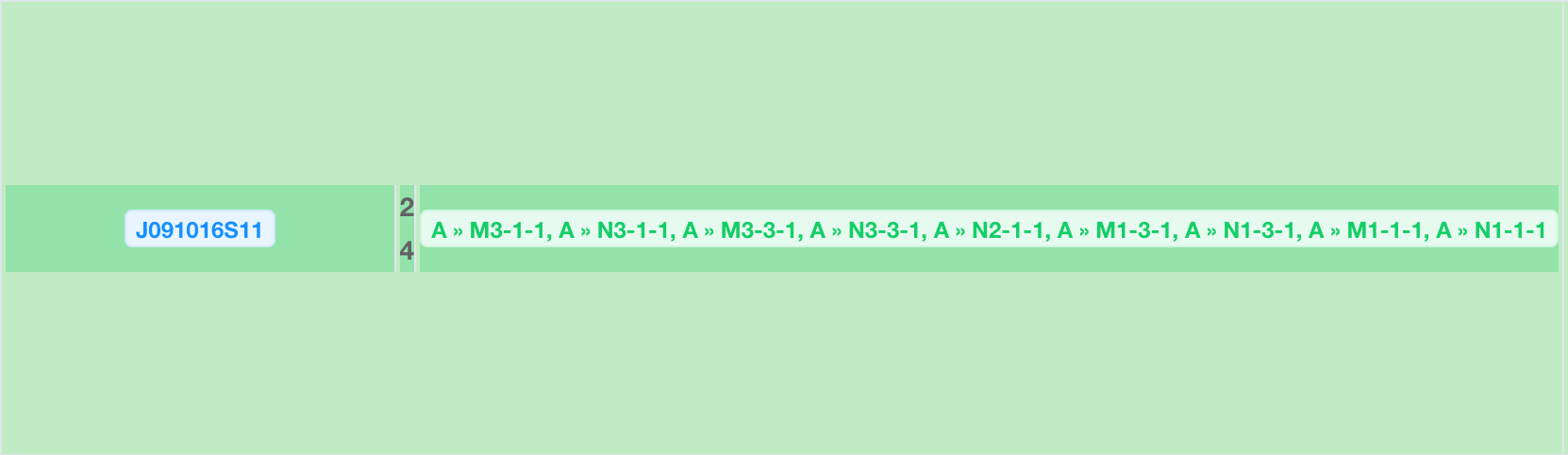 由于任务履行有先后,且相同物品还存在于较早的任务中,所以系统会按顺序遍历所有可用库存:
- 系统会依次显示如果此任务出库扫描时,会依次扣减的库位。
- 库位排在先面的,对应的可能是系统中所有待处理任务中相同物品的数量。 这样情况下,如果按照系统提示的库位去依次捡料,那怕此任务在其他包含相同物品的任务前出库,系统也会按着显示的库位顺序来扣减库存。
物品的重量信息必须完整 #
否则将提示物品缺少重量信息,补全后方可请求运单。
选择快递 #
2C #
- 默认任务的承运商都是Unknown,需要根据目的国和物品尺寸重量选择适合的承运商。
- 同时系统会根据之前出单的配置预加载所以有些任务可以直接一键出单,
一般都是DHL,如果符合「Warenpost」的就选「Warenpost」。重量 >= 10 KG,选用GLS-P。
2B #
- 德国境内的FBA:「DHL FBA」
- 欧盟FBA:「UPS」或「DHL FBA」,具体使用详见下表
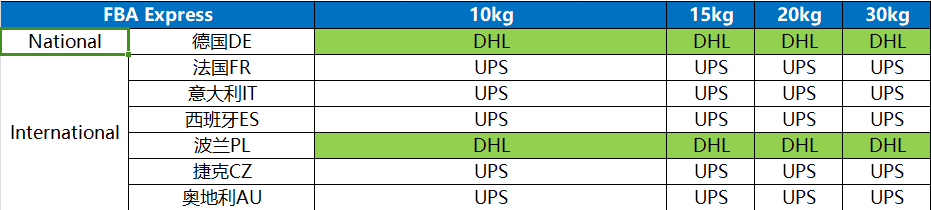
注意:意大利IT的邮编:66050,Amazon PSR2的FBA仓用DHL
出库任务拣料打单发货流程 Outbound Task Picking, Labeling, and Shipping Process #
注意:如果手动推Picklist,请调整每页任务数量后全部选中任务再推,这样生成的Picklist不会零散。
- 按客户及任务中物品配置情况归结成
Picklist,订单状态变为「In Picklist」,物品预选扣减库位; - 拣料单的优先级高的,底色会变为红色,需要优先处理拣料;
- 在
Picklist中打印出拣料单,通过PDA上的Picking Scan扫描拣料单上的条码开始拣料,按Picking Scan上面的物品、位置进行拣货- 找到物品,先扫「Item ID」,扫一次代表拣料数量增加一,再扫「Location」
- 当物品被从货架上取出时,需在系统里同时输入实际拿取数量并点确认,订单状态变为「Ready to Pack」。
- 拣料完成后,找到对应的
Pack Scan扫描,扫描完成后,订单状态变为「Packed」。
请注意不同类型的
Pack Scan:
Pack Scan Order是以任务为单位的打包,必须扫描任务中所有物品才会出现运单或者有请求运单的选项Pack Scan Batch是以物品种类为单位的同种物品批量打包,需要一批次一种物品的扫描操作,每次输入的数量与当前批次已经摆放好的物品数量一致!
- Summarize into a
Picklistaccording to the customer and item configuration in the task. The order status changes to “In Picklist”, and the items pre-select storage locations for deduction; - Print the picklist in the
Picklist, and start picking by scanning the barcode on the picklist through thePicking Scanon the PDA, picking items according to the items and locations on thePicking Scan- Find the item, first scan the “Item ID”, scanning once increases the picking quantity by one, then scan the “Location”
- When the item is taken off the shelf, you need to enter the actual quantity taken in the system and confirm. The order status changes to “Ready to Pack”.
- After picking is completed, find the corresponding
Pack Scanand scan it. After scanning, the order status changes to “Packed”.- Note the different types of
Pack Scan:Pack Scan Orderis packing by task. You must scan all items in the task to generate a shipping label or have the option to request a shipping labelPack Scan Batchis batch packing by single item, requiring scanning operations for each item
- Note the different types of
出库扫描 #
所有物品出库都需要扫描,以下是扫描的优先级:
All items need to be scanned for outbound. The scanning priority is as follows:
- 运单号,如果通过系统生成了运单,每一单都需要扫描 Shipping label number, if a shipping label is generated by the system, each order needs to be scanned
- FBA箱单,如果没有出运单就扫描每一个箱单 FBA box label, if there is no shipping label, scan each box label
- 以上都没有,就在系统生成并打印「Order Label」然后扫描出货 If none of the above, generate and print the “Order Label” in the system and then scan for shipment
危险品 Danger Goods #
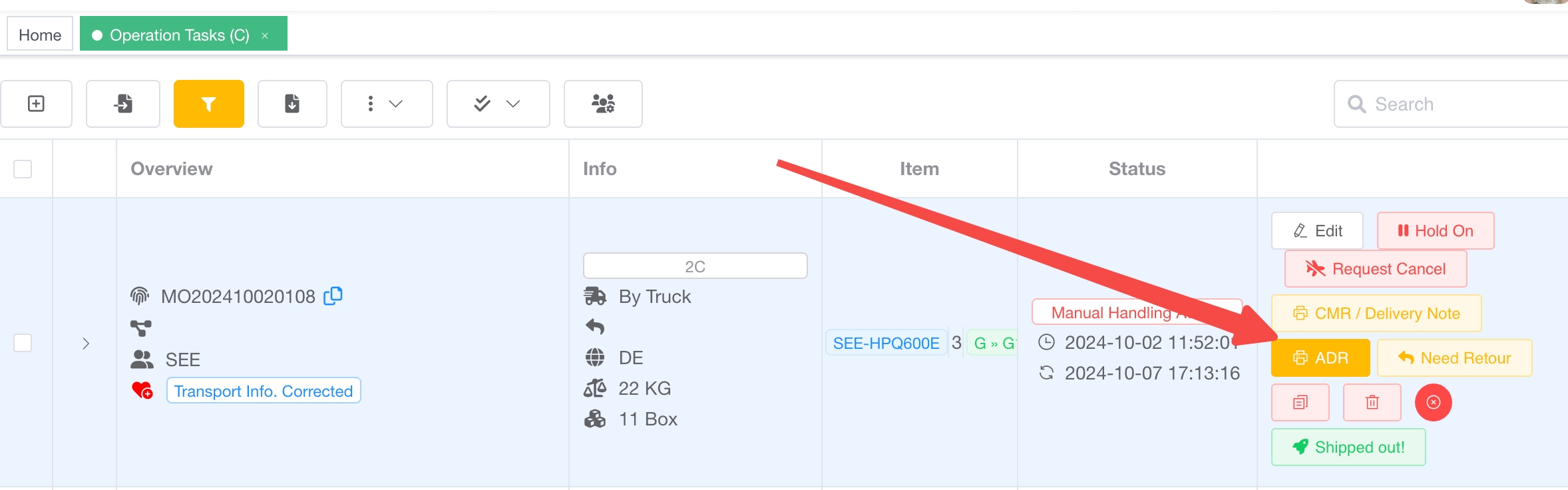
ADR #
如果任务勾选了「Danger Goods」,填写完对应信息后,就可以在仓库视角打印ADR。
操作节点 Operation Check Points #
每个出库任务都会以「生成运单」、「打包完成(打印运单)」和「出库扫描」三个关键节点为操作节点,具体截图如下:

Loxx #
- 整卡订车需要注明:eine Ladung mit 13,6 LDM